
Karris Free Tools
Useful tools.
One less everyday hassle.
Our free, ad-free Windows utilities solve everyday problems. We’re happy to share them, and they help introduce users to other Karris products through links they can choose to explore.
Two tools, practical results
01Save your Explorer workspaceReturn to the folders you need.↘02Put PDFs back to workConvert tables and text for editing.↘Downloads are coming soon. Explore the features below.
01 / Your folders, ready again
Karris Workspace Explorer KWE
Karris Insighter™ for Windows Explorer
Keep the folder tabs you need for a task together—and come back to them later.
Choose an open Windows File Explorer window, save its supported folder tabs as a named workspace, then restore the saved folders into one new Explorer window. Your existing windows stay open.
- Select your windowArrange your folders in Explorer. Choose “Refresh windows” in KWE and select the window to capture.
- Save a named workspaceChoose “Save new…” and give the group a useful name. Supported folder tabs are saved in order.
- Restore when you need itSelect the saved workspace and choose “Restore”. Temporary browsing does not silently change the saved group.
Make cryptic names easier to recognize
When many folders are open, a name such as “0.1.8” may not tell you much. In KWE, choose Short name… to give a saved folder a useful label such as “MyApp”. The label helps you recognize the row and use Show tab to return to its folder.
Short names apply inside KWE. They do not rename the folder or change the native Explorer tab caption. The separate Rename… button changes the saved workspace name.
Windows 11 with native File Explorer tabs. Up to 20 tabs in a selected window; ordinary local or network folder paths only. Virtual locations such as Home, searches and ZIP views are skipped. Windows 10 is not supported.
KWE download coming soonSee KWE in action
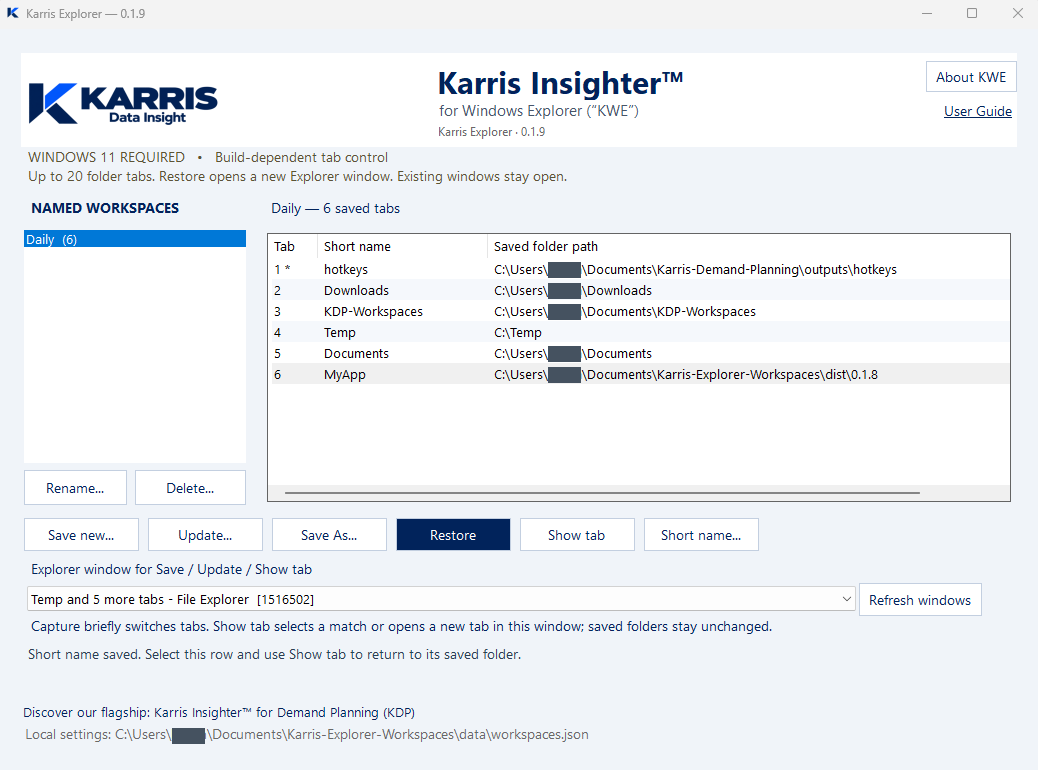
Choose a step above, or open the image at full size. KWE 0.1.9 shown; Windows usernames are redacted. Folder paths and application labels are otherwise unchanged.
02 / From PDF to something editable
Karris PDF Converter KPC
Karris Insighter™ for PDF Conversion
Bring detected PDF tables into Excel, or turn PDF text and tables into an editable Word document.
- PDF to Excel (.xlsx)Export detected tables to worksheets. Supported amount and quantity columns can become numeric cells; identifiers and dates stay as text.
- PDF to Word (.docx)Export editable text and detected tables, with embedded images where available. Complex page layouts need review.
- Read scanned pagesLocal OCR helps extract text and tables from scans. Always check recognized words and numbers against the PDF.
Conversion runs locally and does not require Excel or Word to be installed. Use a compatible application to open the result. Table recognition and formatting vary by PDF; neither output guarantees an identical layout.
KPC download coming soon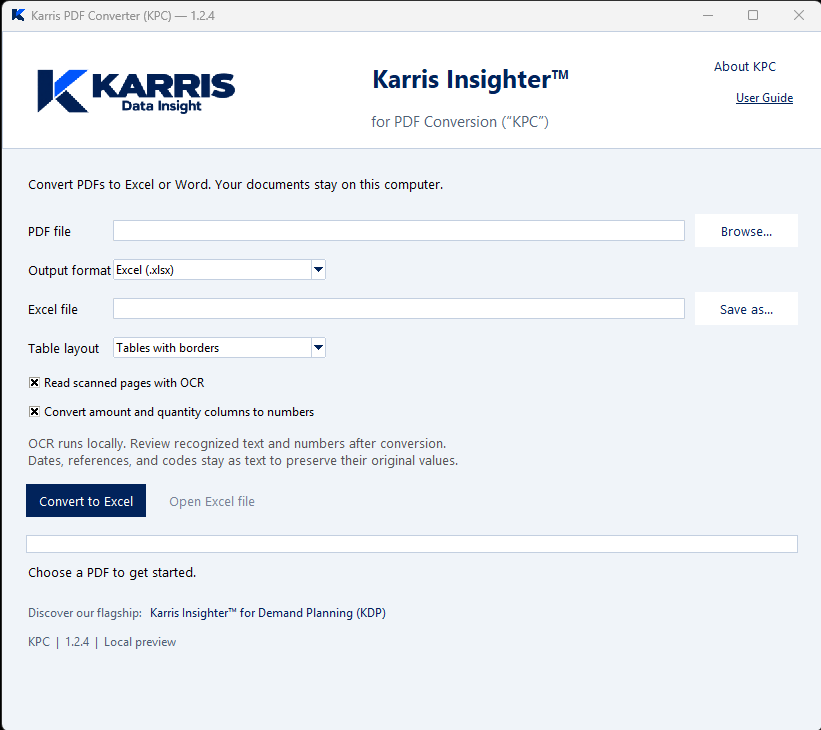
Coming soon
Your tools,
ready when you need them.
We’re preparing Karris Workspace Explorer and Karris PDF Converter for download.
Registration and download-link requests are not open yet. We are not collecting email addresses or sending download emails from this page.
Free and ad-free
Return to this page for availability updates.
Installers are not available from this page yet.
Open about how this works
Free tools. A chance to discover more.
Your choice to explore
The utilities include links to other Karris products. They open a website only when you choose to follow them.
Understanding app referrals
Karris.com measures visits originating from links in the apps to understand how the free tools introduce people to other Karris products. Referral tags identify the app and link placement; the app links do not include email addresses, local file paths or document contents.
Website visits are measured using Plausible Analytics.
Let’s talk
Useful ideas deserve a conversation.
Your brand, a useful connection
Interested in offering a version of these utilities under your own brand to clients or prospects? Contact us to explore the possibilities.
Private Labelling (Software as a marketing tool) →What would you like to solve?
Have an app idea of your own? Tell us about the problem you’d like to solve and the people you’d like to help.
New App Idea (Software as a marketing tool) →These are invitations to discuss possibilities. Customization, branding, distribution and redistribution rights would need a separate agreement.